> ## Documentation Index
> Fetch the complete documentation index at: https://botflow.io/docs/llms.txt
> Use this file to discover all available pages before exploring further.
# Settings
> Manage your API keys, connected accounts, and subscription.
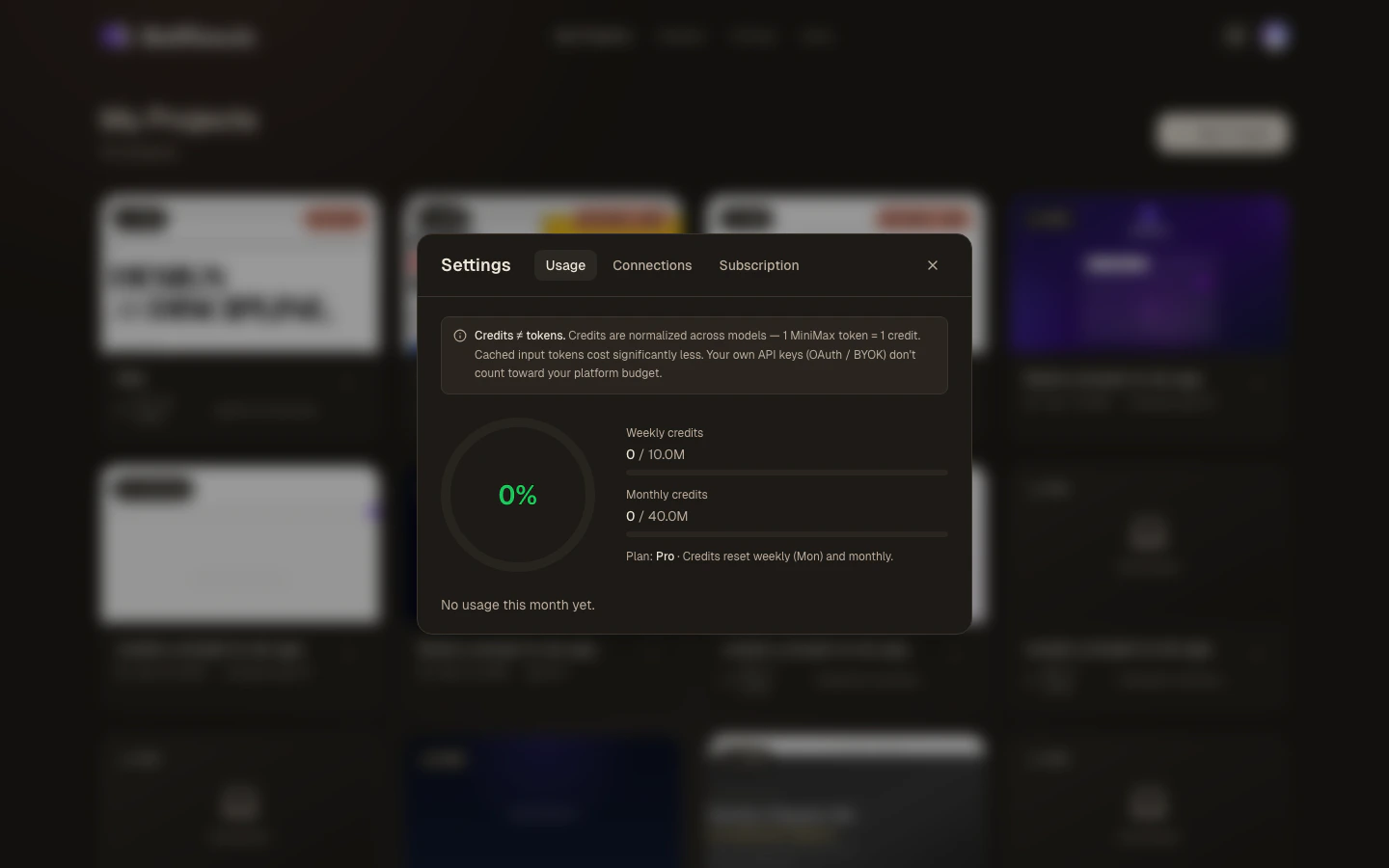 Open Settings by clicking the **gear icon** in the top-left of the workspace or the top-right of the Projects page. The settings modal has three tabs: **Usage**, **Connections**, and **Subscription**.
## Usage
The Usage tab shows how much of your platform credit budget you've consumed.
* **Credit gauge** — a circular progress indicator showing your percentage used
* **Weekly credits** — credits consumed this week vs. your weekly limit
* **Monthly credits** — credits consumed this month vs. your monthly limit
* **Plan indicator** — your current plan (Free, Pro, or Max)
Credits are normalised across models: 1 MiniMax-M2.5 token = 1 credit; Claude Sonnet 4 and GPT-5.3 tokens are weighted proportionally. Cached input tokens cost significantly less. Requests made with **your own API keys or OAuth** do not count toward your platform budget.
Credits reset on a rolling weekly and monthly basis (Monday and the 1st of the month).
## Connections
Open Settings by clicking the **gear icon** in the top-left of the workspace or the top-right of the Projects page. The settings modal has three tabs: **Usage**, **Connections**, and **Subscription**.
## Usage
The Usage tab shows how much of your platform credit budget you've consumed.
* **Credit gauge** — a circular progress indicator showing your percentage used
* **Weekly credits** — credits consumed this week vs. your weekly limit
* **Monthly credits** — credits consumed this month vs. your monthly limit
* **Plan indicator** — your current plan (Free, Pro, or Max)
Credits are normalised across models: 1 MiniMax-M2.5 token = 1 credit; Claude Sonnet 4 and GPT-5.3 tokens are weighted proportionally. Cached input tokens cost significantly less. Requests made with **your own API keys or OAuth** do not count toward your platform budget.
Credits reset on a rolling weekly and monthly basis (Monday and the 1st of the month).
## Connections
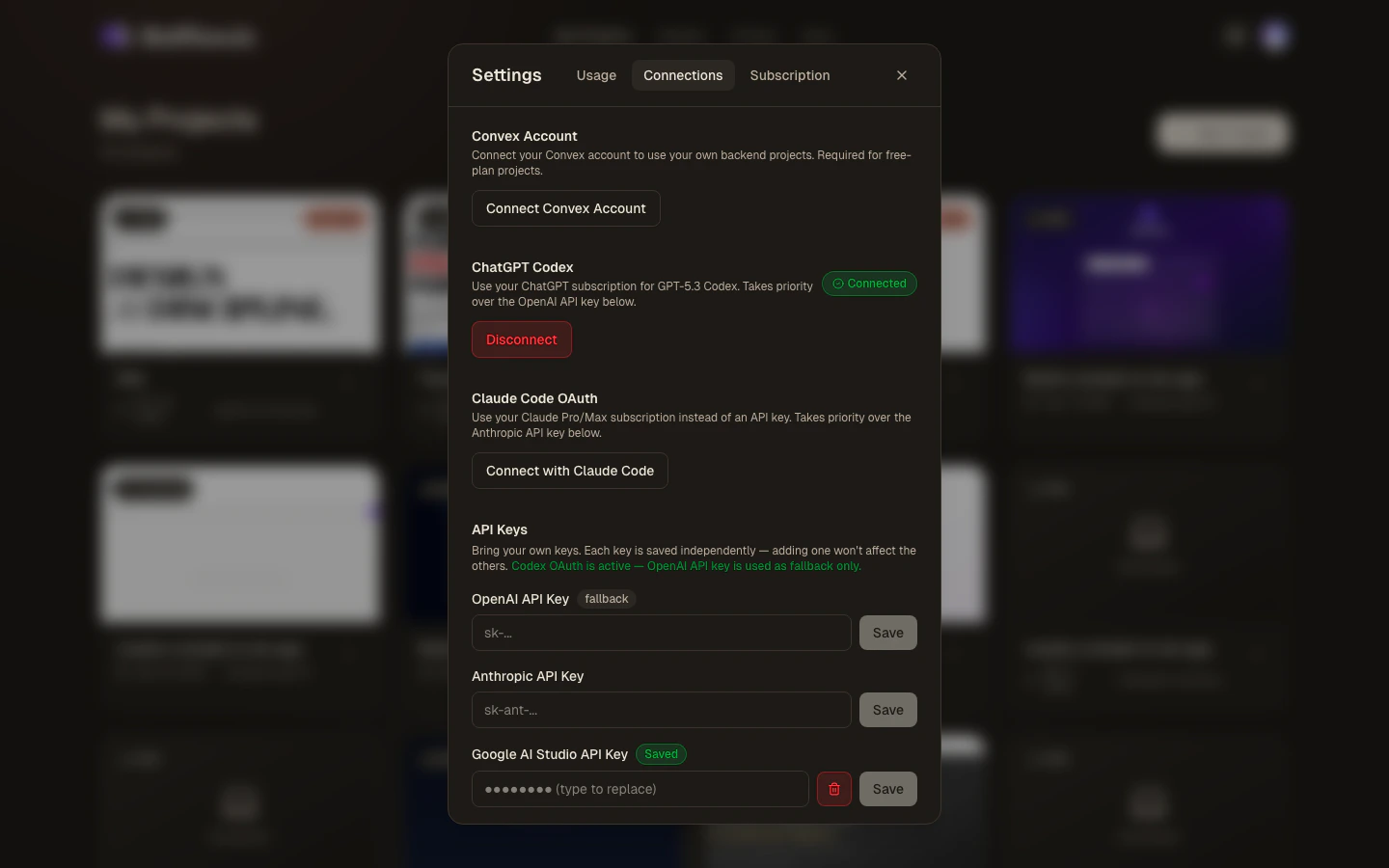 The Connections tab is where you wire up model providers and backend services.
### API keys
Paste a key for any provider to use that provider's models without spending platform credits:
| Provider | Key format | Models unlocked |
| -------------------- | -------------- | -------------------------------- |
| **OpenAI** | `sk-...` | GPT-5.3 Codex, GPT-5.4 |
| **Anthropic** | `sk-ant-...` | Claude Sonnet 4, Claude Opus 4.7 |
| **Google AI Studio** | `AIza...` | Gemini 3.1 Pro |
| **Fireworks AI** | `fw_...` | MiniMax-M2.5, GLM-5.1, Kimi K2.6 |
| **Moonshot** | `moonshot-...` | Moonshot models |
To save a key:
1. Paste it into the input field next to the provider name.
2. Click **Save**.
To remove a saved key, click the **trash icon** next to the provider. The key is deleted from Botflow's servers immediately.
Your keys are stored encrypted on Botflow's servers and are never exposed in the browser or in logs. Even so, treat them like passwords — avoid using production keys for personal experiments, and rotate them if you suspect exposure.
### Claude OAuth
Instead of an API key, you can sign in to your Anthropic account directly:
1. Click **Connect with Claude**.
2. Review the permissions and click **Authorize**.
3. You'll be redirected back to Botflow. Claude models are now available without an API key.
The OAuth token is refreshed automatically. To disconnect, click **Disconnect Claude**.
### Codex OAuth
Connect your OpenAI account via a device-code flow:
1. Click **Connect with Codex**.
2. Botflow displays a short user code (e.g. `ABCD-1234`).
3. Open [openai.com/device](https://openai.com/device) in any browser and enter the code.
4. Approve the authorisation in your OpenAI account.
5. Botflow polls for completion and confirms when the token is saved.
GPT-5.3 Codex and GPT-5.4 will then use your OpenAI account directly.
### Convex OAuth (Free plan)
Free-plan users who want a Convex backend connect their own Convex account here:
1. Click **Connect Convex**.
2. Paste your Convex deployment URL from [dashboard.convex.dev](https://dashboard.convex.dev).
3. Click **Save**.
Botflow injects this URL as the `VITE_CONVEX_URL` environment variable automatically.
## Subscription
The Subscription tab shows your current plan and lets you upgrade, downgrade, or cancel. The pricing table is embedded directly — no need to navigate to a separate page.
If you're inside the workspace, clicking **Subscription** opens the pricing page in a new tab instead of embedding it. This is because the workspace uses strict browser isolation (COEP headers) that prevents third-party payment iframes from loading inline.
See [Pricing](/docs/pricing) for a full breakdown of what each plan includes.
***
## Keyboard shortcut
You can open Settings from the keyboard: focus the workspace and press `?` to see all keyboard shortcuts, including the one for Settings.
The Connections tab is where you wire up model providers and backend services.
### API keys
Paste a key for any provider to use that provider's models without spending platform credits:
| Provider | Key format | Models unlocked |
| -------------------- | -------------- | -------------------------------- |
| **OpenAI** | `sk-...` | GPT-5.3 Codex, GPT-5.4 |
| **Anthropic** | `sk-ant-...` | Claude Sonnet 4, Claude Opus 4.7 |
| **Google AI Studio** | `AIza...` | Gemini 3.1 Pro |
| **Fireworks AI** | `fw_...` | MiniMax-M2.5, GLM-5.1, Kimi K2.6 |
| **Moonshot** | `moonshot-...` | Moonshot models |
To save a key:
1. Paste it into the input field next to the provider name.
2. Click **Save**.
To remove a saved key, click the **trash icon** next to the provider. The key is deleted from Botflow's servers immediately.
Your keys are stored encrypted on Botflow's servers and are never exposed in the browser or in logs. Even so, treat them like passwords — avoid using production keys for personal experiments, and rotate them if you suspect exposure.
### Claude OAuth
Instead of an API key, you can sign in to your Anthropic account directly:
1. Click **Connect with Claude**.
2. Review the permissions and click **Authorize**.
3. You'll be redirected back to Botflow. Claude models are now available without an API key.
The OAuth token is refreshed automatically. To disconnect, click **Disconnect Claude**.
### Codex OAuth
Connect your OpenAI account via a device-code flow:
1. Click **Connect with Codex**.
2. Botflow displays a short user code (e.g. `ABCD-1234`).
3. Open [openai.com/device](https://openai.com/device) in any browser and enter the code.
4. Approve the authorisation in your OpenAI account.
5. Botflow polls for completion and confirms when the token is saved.
GPT-5.3 Codex and GPT-5.4 will then use your OpenAI account directly.
### Convex OAuth (Free plan)
Free-plan users who want a Convex backend connect their own Convex account here:
1. Click **Connect Convex**.
2. Paste your Convex deployment URL from [dashboard.convex.dev](https://dashboard.convex.dev).
3. Click **Save**.
Botflow injects this URL as the `VITE_CONVEX_URL` environment variable automatically.
## Subscription
The Subscription tab shows your current plan and lets you upgrade, downgrade, or cancel. The pricing table is embedded directly — no need to navigate to a separate page.
If you're inside the workspace, clicking **Subscription** opens the pricing page in a new tab instead of embedding it. This is because the workspace uses strict browser isolation (COEP headers) that prevents third-party payment iframes from loading inline.
See [Pricing](/docs/pricing) for a full breakdown of what each plan includes.
***
## Keyboard shortcut
You can open Settings from the keyboard: focus the workspace and press `?` to see all keyboard shortcuts, including the one for Settings.